Arc en Ciel help
Discord bot workflows
Use the Arc en Ciel Discord bot for account linking, image uploads, search, browse, recent uploads, and model actions.
Before you start
- A Discord account in a supported Arc en Ciel guild.
- An Arc en Ciel account when the command needs ownership, uploads, or account-linked actions.
- A channel where the bot has permission to read messages, add reactions, and send replies.
Quick answer
- Use the bot when you want to upload Discord images to Arc, search Arc content from Discord, or open quick actions for an Arc model link.
- Link your account before upload commands that need ownership. Use /arc link-status if you are unsure which account is connected.
- Never post account-link URLs, upload grants, API keys, or Civitai cookies in a public channel.
What the bot does
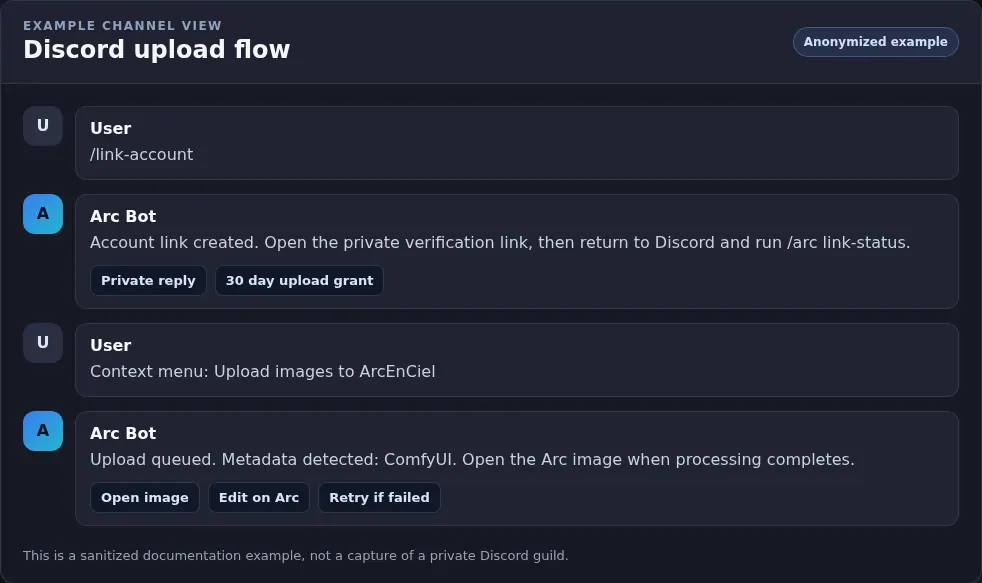
The Discord bot lets you do a few Arc en Ciel tasks without leaving Discord. You can upload generated images, link your Discord user to an Arc account, search Arc models or images, browse recent uploads, open Arc links, and use model action buttons from Discord messages.
| Command | Use | Visibility |
|---|---|---|
| Upload images to ArcEnCiel | Right-click/message-menu upload for supported image attachments. | Usually private feedback where Discord allows it. |
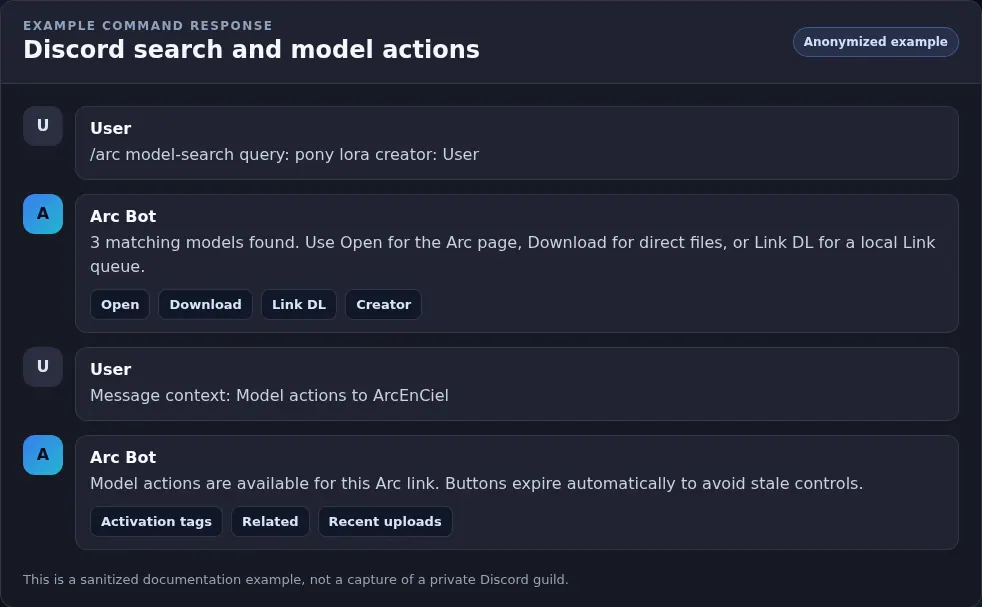
| Model actions to ArcEnCiel | Message-menu action for Arc model links; posts model action buttons. | Reply without ping; action message auto-expires. |
| /link-account | Creates a one-time link so the bot knows which Arc account to use. | Private; do not share the verification link. |
| /arc upload | Uploads from a Discord message link when the menu action is not convenient. | Command response in Discord. |
| /arc help | Shows upload rules and troubleshooting hints. | Discord command response. |
| /arc link-status | Checks whether your Discord upload grant/account link is active. | Private status check. |
| /arc uploads-recent | Shows recent uploads, public or private depending on command options. | Private or channel-visible depending on command options. |
| /arc model-search and /arc image-search | Searches Arc en Ciel models or images by text and creator autocomplete. | Discord command response. |
| /arc browse and /arc open | Browses feeds or opens Arc content by URL/shorthand such as model:123. | Discord command response. |
| /arc creator-recent | Shows newest model, image, video, or article uploads for a creator. | Discord command response. |
Upload by command or context menu
- Link your account with /link-account if the bot asks for account ownership or an upload grant.
- Open the Discord message with the generated image attachment.
- Use the message context action "Upload images to ArcEnCiel" or pass the message URL to /arc upload.
- Wait for the bot response. Successful uploads become Arc images under the linked account or allowed upload context.
- Open the uploaded image on Arc en Ciel and fix title, rating, tags, model links, or prompt notes if needed.
Auto upload by reaction
Some Discord channels can use reaction upload. When the bot sees a supported generated-image attachment, it adds the Arc reaction. If the original message author reacts with the same emoji, the bot uploads the image to Arc en Ciel.
Reaction upload rules
- Supported files - JPEG, PNG, and WebP image attachments are supported up to the configured 50 MB limit.
- Original author action - The original Discord message author must use the trigger reaction.
- Configured guild only - Auto reactions run only in channels where staff enabled them.
- Metadata matters - If generator metadata is missing, the bot may not add the upload reaction automatically.
- Silent by default - Reaction uploads avoid noisy channel messages, but may still use processing or failure reactions.
Browse and model actions
The bot can also act like a small Arc browser inside Discord. Search commands find models and images, and model-link actions can show buttons for downloads, Link actions, or other configured model tasks.
Useful bot surfaces
- Recent uploads carousel
- Paged Discord view for checking what was uploaded recently.
- Model search
- Find models by text, creator, or autocomplete before opening them on Arc en Ciel.
- Image search
- Find images by prompt/search text and creator context.
- Open shorthand
- Open content with a URL or shorthand such as model:123 when supported.
- Model actions
- Reply buttons for Arc model links, cleaned up automatically so stale actions do not linger.
Discord bot troubleshooting
No upload reaction appears
Likely cause: The attachment may be unsupported, too large, missing generator metadata, in a disabled channel, or the bot lacks permissions.
Fix: Use /arc help, try the context command, or ask staff whether auto reactions are enabled for the channel.
Upload goes to the wrong account or is rejected
Likely cause: The Discord upload grant may be expired, linked to the wrong account, or missing for the current guild.
Fix: Run /arc link-status, then /link-account again if needed. Revoke with /arc unlink-upload if the wrong grant is active.
Search or browse commands return nothing useful
Likely cause: The query may be too narrow, content may be hidden by rating/privacy, or creator autocomplete may point to the wrong profile.
Fix: Use broader search text, open the Arc page directly, and check rating/account visibility on the website.
Buttons disappeared from a model action reply
Likely cause: Model action replies intentionally auto-delete after a short window to avoid stale Discord controls.
Fix: Run the context action again from the original Arc model link.